
Has the time come when you want more out of the floral images you are photographing? Would you like to learn how to post-process your images to give them a "wow" factor? If you answered "yes", please review the inspiration and education that I offer through my non-expiring online courses. Learn to take your images to new levels of excellence by watching and practicing the techniques I teach. These techniques are easy to follow, and you will be surprised by how quickly you start using them to post-process your own flowers.
Below is a list of my most popular courses with a short description of the curriculum. Each course also includes a link to a dedicated website with more information about the course content, pricing, and the option to purchase.
If you have subscribed to The Joy of Flower Photography, you will receive periodic emails with course discounts. my courses for 2026. If you are looking to make a purchase in the next 24 hours, please use this link to request a special discount code.

This collection of 17 lessons is intended to build the foundation for all other changes you want to make to your image. Starting in Lightroom (or Adobe Camera Raw), you will learn the correct way to process your images for color and light.
The Photoshop lessons will teach you the most critical skills to take your post-processing skills to new levels. If you purchase any other course, you can receive this course for free.
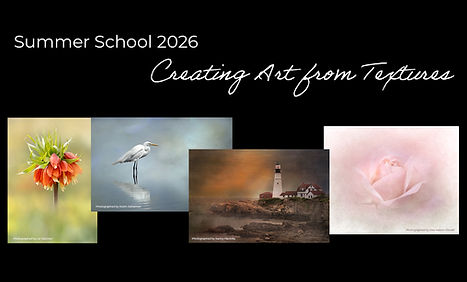
The easiest way I know to create outstanding images in a short amount of time is to use textures to do the heavy lifting in Photoshop. Using textures is relatively easy, creative, and it yields outstanding results!
This course will teach you to use textures to enhance flowers, animals, birds, landscapes, seascapes, and more. Each finished image in this course was taken from an ordinary snapshot to a work of art. These 9 lessons will forever change the way you post-process your images

This is the most unique teaching experience I have ever had. Participants sent in images they wanted me to "reimagine." Over these 12 lessons, I worked together with the attendees "live" as we used our collective voices to determine the steps we would take to enhance the original image.
During the demonstrations, I taught simple, traditional Photoshop techniques and also included some of the new Adobe AI techniques.

Floral Whispers is a technique that I developed for producing soft flowers with dreamy backgrounds, using my specially created Whispers brushes. These brushes only work in Photoshop to paint and create a Floral Whispers image.
You can use the brushes with a mouse or a Wacom tablet and stylus.
This 10-Lesson course will help you to create beautifully soft floral images, even if you captured the flower with your phone.
Click here for more information and to purchase this course.

Let me say up front, "Creating Textures in Photoshop" is not just for flowers! Using my background creation technique along with my special “background” brushes, you can create background textures for flowers, animals, birds, and even to enhance fog and sunsets.
The textures can have a variety of "looks", depending on the brushes you use, but the end result will be a texture that fits your image.
Click here for more information, or to purchase this course.

Painting Flowers in Photoshop was my first painting course. Over a period of three years, I developed brushes that would work in Photoshop to create brush strokes when using a Wacom Pro tablet and stylus. This 12-lesson course will give you the tools to create faux-painted images that are different from anything you've ever seen. While there are plug-ins that portray "painting", my brushes are as close as you can come to using a canvas and painting an image from scratch.
*Please note that the brushes in this course only work properly with a Wacom Pro tablet and stylus.
Click here for more information, or to purchase this course.

The 10 lessons found in The Webinar Wednesday Replays will teach you how to use very easy but little-known techniques in Photoshop. You will learn everything from understanding how to use the Crop HUD to creating fantastic Triptychs, along with a variety of other outstanding tips/tricks to make your post-processing easier and more effective in creating stellar images.
The sales of courses is non-refundable regardless of reason.